
Product design
Field Service Inspection App
A mobile-first solution designed to enhance a driver’s experience and allow them to better synchronize with service agents.
Industry
Top 3 Equipment Rental Company
Agency
CapTech Consultancy
My Role
Product designer, visual designer
Discipline
A/B testing
Figma
iOS app design
Journey mapping
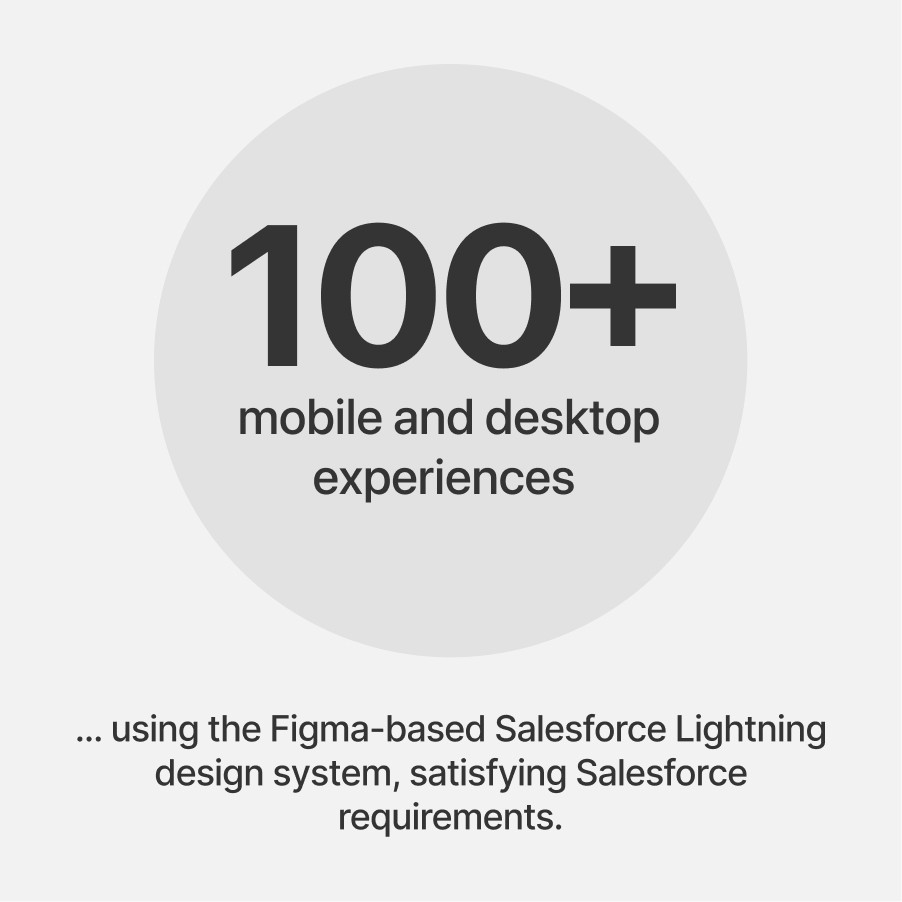
Lightning Design System (LDS)
Product design
Prototyping
Salesforce
Stakeholder and user interviews
User personas
UX/UI
Visual design
WCAG conformance
Product design
Field Service Inspection App
A mobile-first solution designed to enhance a driver’s experience and allow them to better synchronize with service agents.
Industry
Top 3 Equipment Rental Company
Agency
CapTech Consultancy
My Role
Product designer, visual designer
Discipline
A/B testing
Figma
iOS app design
Journey mapping
Lightning Design System (LDS)
Product design
Prototyping
Salesforce
Stakeholder and user interviews
User personas
UX/UI
Visual design
WCAG conformance

Ask
Out with the old…
As a leading equipment rental company's team grew, leadership saw a dire need to update their 30-year-old MS-DOS and pencil/paper record-keeping system.
Ask
Out with the old…
As a leading equipment rental company's team grew, leadership saw a dire need to update their 30-year-old MS-DOS and pencil/paper record-keeping system.
Ask
Out with the old…
As a leading equipment rental company's team grew, leadership saw a dire need to update their 30-year-old MS-DOS and pencil/paper record-keeping system.


Discovery
Untangling one big knot
Because of the complexity of the client’s logistics and service processes, the research and discovery phases took the longest. We utilized a handful of UX methodologies, but the most impactful was spending a day with drivers on their daily route. That first-hand experience was vital to building a precise picture of the pain points the inspection app needed to solve.


Desk research notes — MS-DOS work order screen

Desk research notes — scans of paper MS-DOS job aids.
Analysis
Visualizing paint points
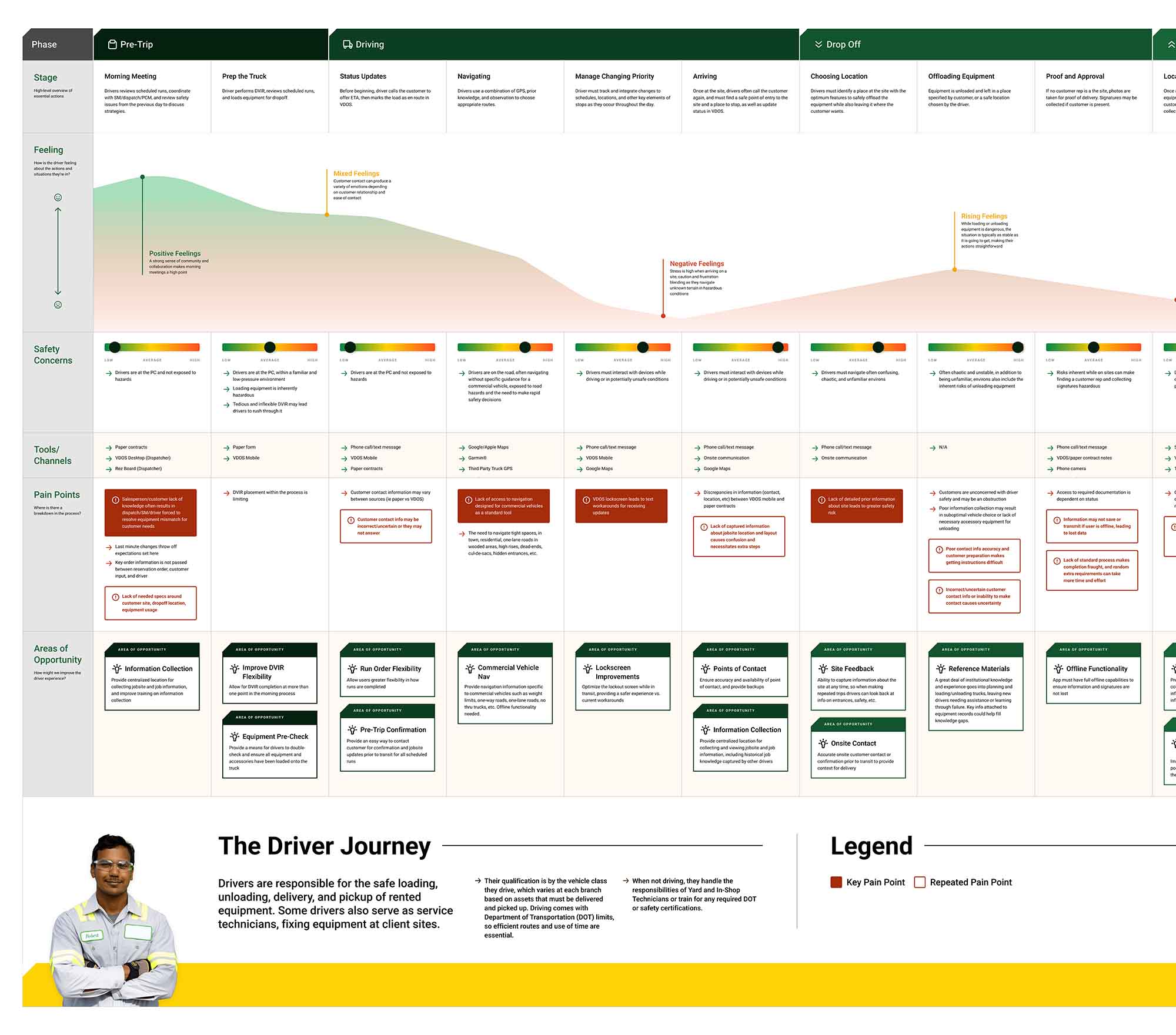
After analyzing the research, the findings were dense and complex. I needed a way to convey that information in a way that was accessible to stakeholders and easy for us to reference later. To address this, I designed detailed visualizations for the user personas and a journey map.


Driver user persona illustrating their daily tasks, pain points, and needs.
Driver user persona illustrating their daily tasks, pain points, and needs.
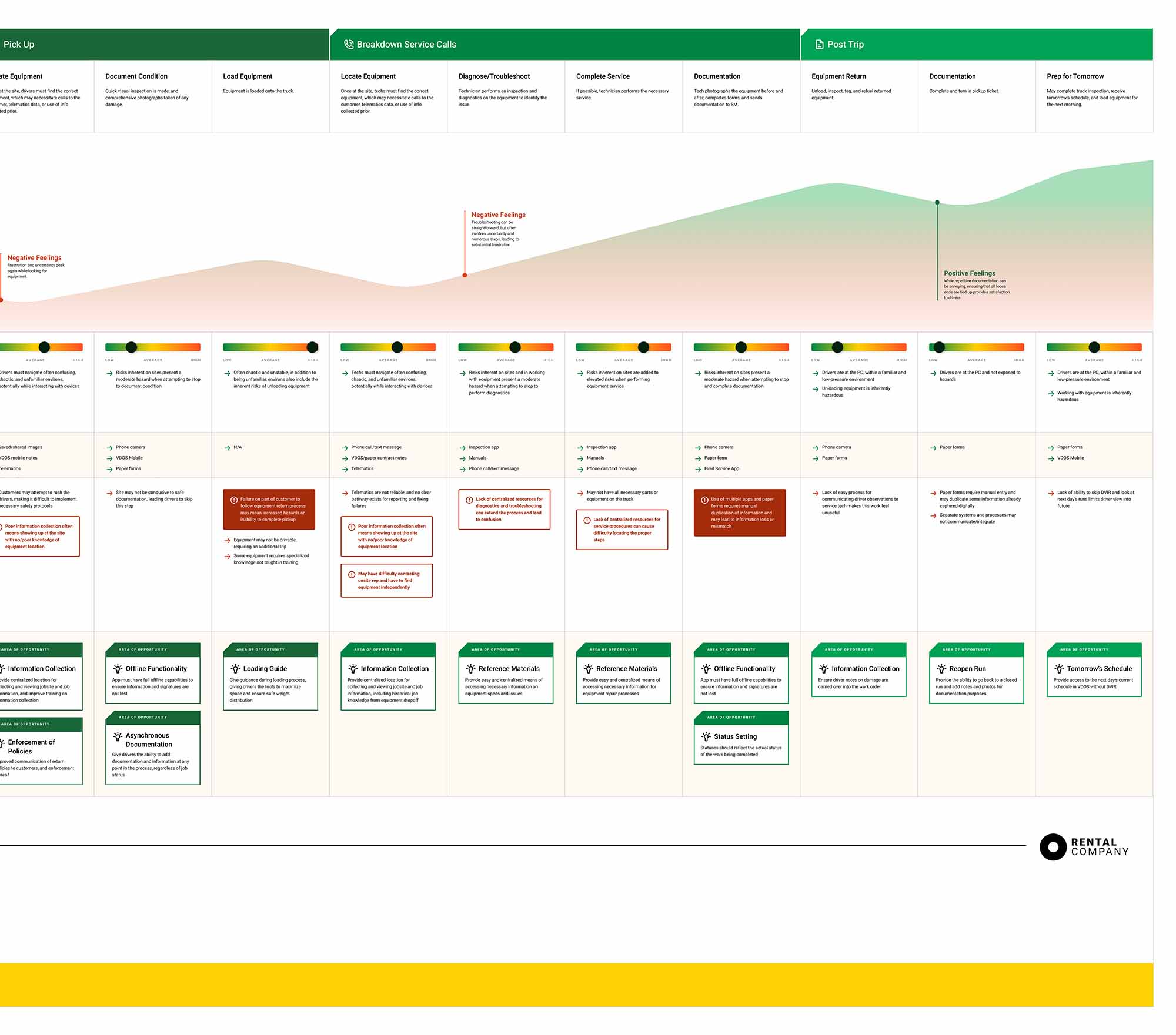
I structured the journey map around six phases of a driver’s day — pre-trip, driving, drop-off, pick-up, breakdown service calls, and post-trip. Each phase detailed what a driver felt, their primary safety concerns, the tools they used, the pain points they experienced, and opportunities for improvement.
I structured the journey map around six phases of a driver’s day — pre-trip, driving, drop-off, pick-up, breakdown service calls, and post-trip. Each phase detailed what a driver felt, their primary safety concerns, the tools they used, the pain points they experienced, and opportunities for improvement.
I structured the journey map around six phases of a driver’s day — pre-trip, driving, drop-off, pick-up, breakdown service calls, and post-trip. Each phase detailed what a driver felt, their primary safety concerns, the tools they used, the pain points they experienced, and opportunities for improvement.

Detailed driver journey map illustrating their daily routine from pre-trip to post.
The heart of the map is a bar graph that lets stakeholders see the primary problem areas along the driver’s journey at a glance and, with further reading, quickly skim the context.
The heart of the map is a bar graph that lets stakeholders see the primary problem areas along the driver’s journey at a glance and, with further reading, quickly skim the context.
The heart of the map is a bar graph that lets stakeholders see the primary problem areas along the driver’s journey at a glance and, with further reading, quickly skim the context.

Notable areas of tension: Drop-off and pick-up stages of a driver's journey + associated feelings
The current workflow forces unnecessary cognitive work at several key steps, with no way to resolve mistakes before they become costly.
The current workflow forces unnecessary cognitive work at several key steps, with no way to resolve mistakes before they become costly.
The current workflow forces unnecessary cognitive work at several key steps, with no way to resolve mistakes before they become costly.

Design
Building the right solutions
After validating with stakeholders and working with product managers to develop a large list of user stories and organize them into feature sets, our team began developing user flows, wireframes, and prototypes. I split my time between designing two experiences: → Work order quotes user flow in Salesforce desktop → The entirety of the driver inspection app.

Design
Creating work order quotes in Salesforce
I designed a semi-custom Salesforce desktop experience for service members to create work order quotes, capturing equipment details, estimated labor and mileage, damage causes and cures, job-site appointments, and notes for the assigned road tech or driver. Recording these details prevents drivers from dealing with things like poor information collection and missing job-site details that could compromise their safety.
Design
The inspection app, powered by Salesforce
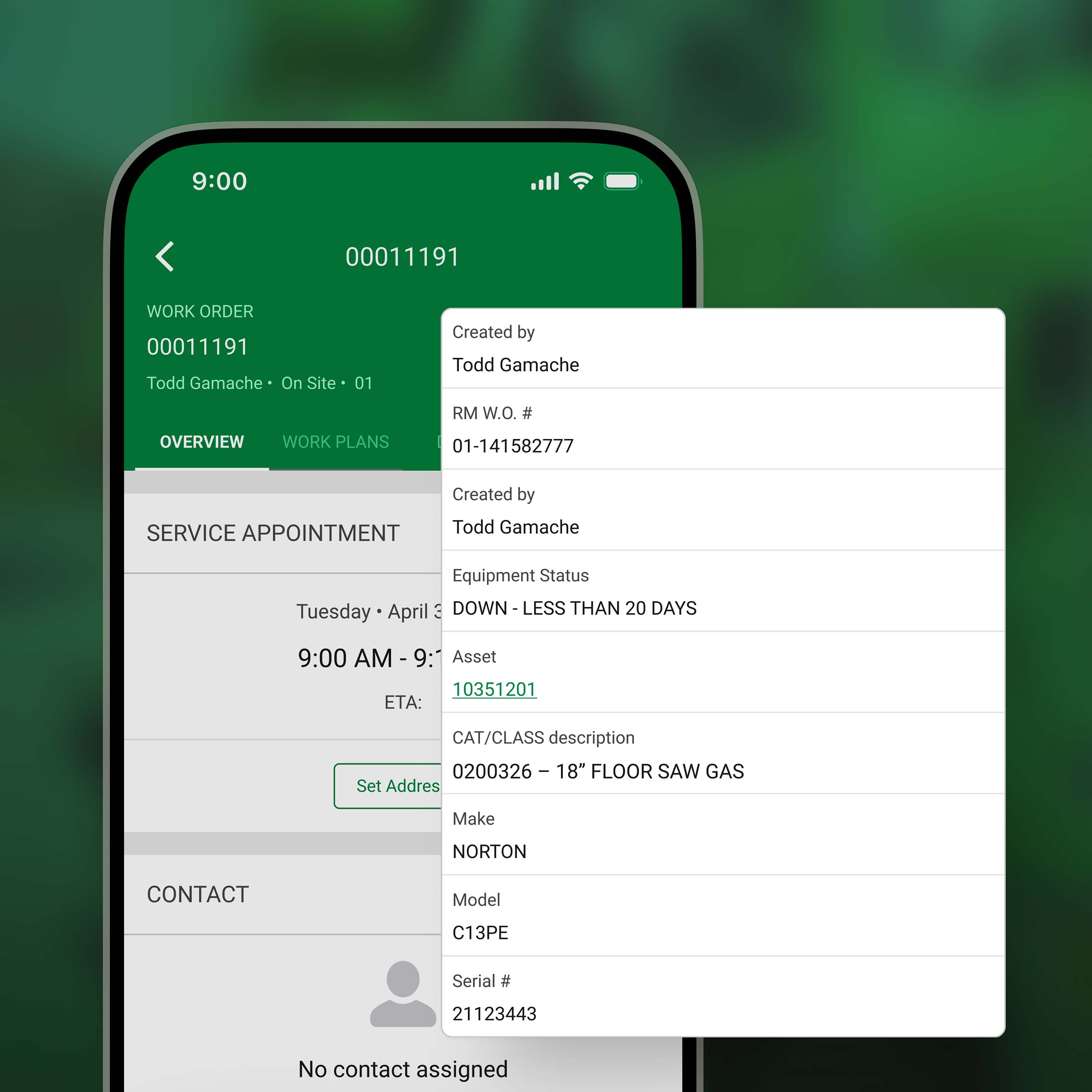
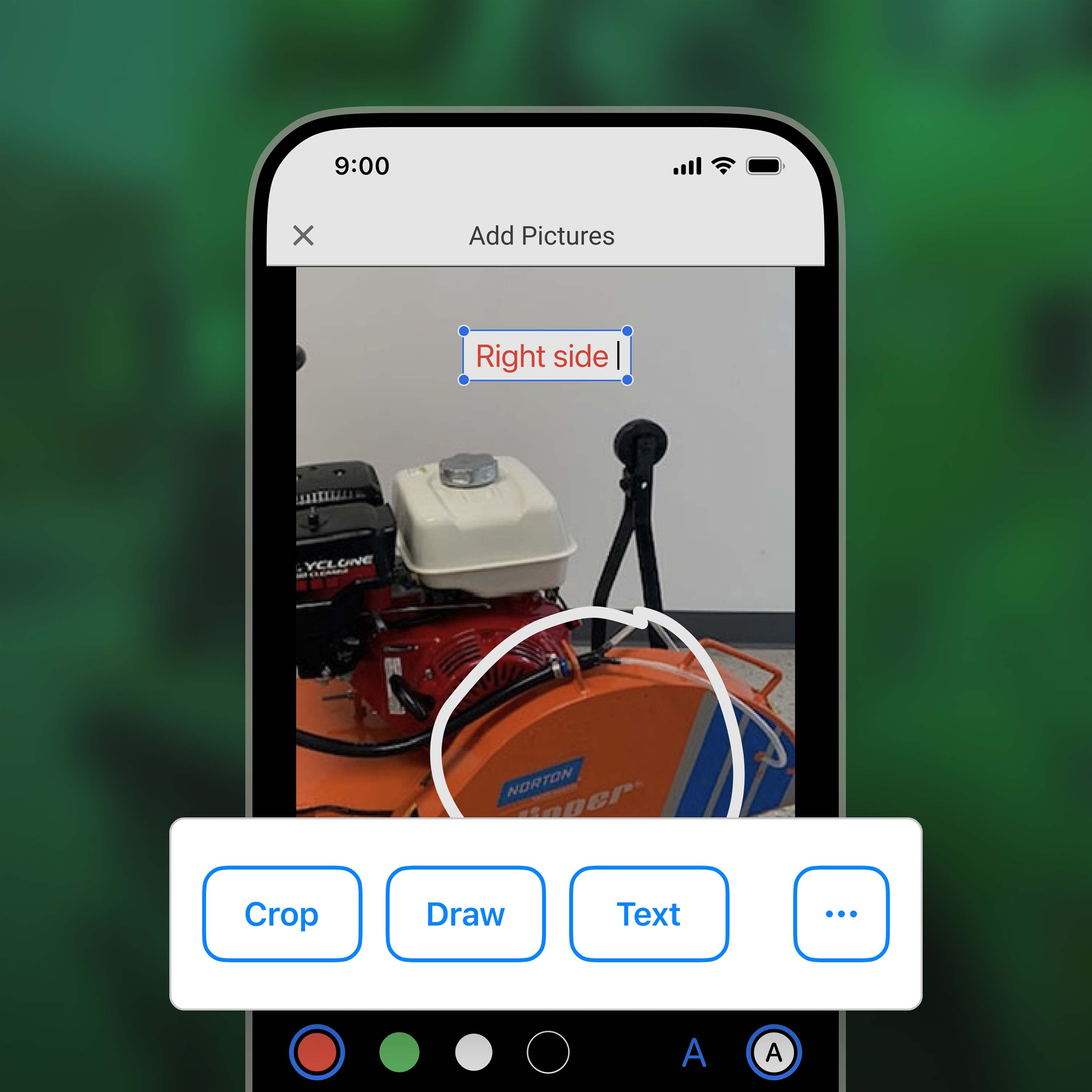
The app pulls in all relevant work order and job site information from the Salesforce database and is designed to let drivers complete four tasks: → Rent-ready inspection steps → Enter labor and mileage → Preventive maintenance steps → Submit final inspections to Salesforce. The app aligns work order records with drivers’ on-site needs and lets them submit completed inspections to Salesforce accurately, consistently, and in real time.
Detailed driver journey map illustrating their daily routine from pre-trip to post.


Inspection app key screens



Design
The guiding UX principle for using the inspection app is "No thumbs."
Entering inspection and maintenance details by typing was slightly faster than paper and pencil but still slowed drivers and increased errors and skipped steps. I designed core features to be mobile-first and, when possible, required minimal typing and taps to create or complete inspections.
Design
The guiding UX principle for using the inspection app is "No thumbs."
Entering inspection and maintenance details by typing was slightly faster than paper and pencil but still slowed drivers and increased errors and skipped steps. I designed core UI patterns and flows to be mobile-first and, when possible, required minimal typing and taps to create or complete inspections.
Design
The guiding UX principle for using the inspection app is "No thumbs."
Entering inspection and maintenance details by typing was slightly faster than paper and pencil but still slowed drivers and increased errors and skipped steps. I designed core features to be mobile-first and, when possible, required minimal typing and taps to create or complete inspections.


Sample hi-fi flow — Generate inspection


Sample hi-fi flow — Rent ready inspection
Friction point
Out-of-the-box vs. custom
Migrating the rental company’s entire equipment-servicing workflow from MS-DOS to Salesforce was a costly undertaking that stakeholders were very sensitive to. Veteran shop foremen and technicians valued the MS-DOS system for its speed and single-screen efficiency, but road techs and drivers lamented having to use paper forms for inspections on-site.


Out-of-the-box desktop patterns: (1) Work order list view, (2) Work order record, (3) Global edits
Friction point
The conflict
My team and I argued that to deliver a Salesforce experience that met user needs, we would need to design extensive custom Lightning Design System components. Stakeholders wanted to stick with an all-OOTB experience to keep costs as low as possible. Custom: → Hard for Salesforce architects to build and maintain → Preserves the speed of work order fulfillment → Fast rent-ready equipment rotation. Out-of-the-box: → Easy to maintain but click-heavy and slow enough to risk user rejection. → Slower equipment check-ins and inspections → Stakeholders wanted to keep costs low.

Custom desktop pattern - Labor and mileage
Inspection app key screens
Custom desktop pattern - Labor and mileage

Custom inspection app patterns
Inspection app key screens
Custom inspection app patterns
Friction point
The compromise
My team and I proposed using mostly out-of-the-box Salesforce, but adding a few very specific custom pieces where speed really matters, such as labor and mileage steps, rent-ready inspection steps, and preventative maintenance steps. Stakeholders were satisfied with this solution because it met their need to keep costs as low as possible while maintaining the speed of fulfilling work orders. Any potential grumbling from veteran MS-DOS power users about the MVP was a trade-off stakeholders were willing to accept.


Inspection app key screens
Bonus ideation
Next-gen driver app exploration
My team also pitched a next-gen mobile-first driver's app. It would incorporate features common in modern driver apps, including route distances and mileage, volume & weight displays, messaging, manifest imaging, fuel markets, and more. One other designer and I illustrated storyboards that narrated the current driver experience versus the benefits of the future-state experience we proposed.


Sample storyboard - Delivery stage current state with existing system

Sample storyboard - Delivery stage current state with existing system

Sample storyboard - Delivery stage future state for driver app concept with driver journey improvements

Sample storyboard - Delivery stage future state for driver app concept with driver journey improvements
Outcomes
The stakeholders were pleased with my deliverables and design recommendations but needed more time to evaluate the build cost. I left the client with extensive UX documentation and options for moving forward, should they choose to proceed.
Outcomes
The stakeholders were pleased with my deliverables and design recommendations but needed more time to evaluate the build cost. I left the client with extensive UX documentation and options for moving forward, should they choose to proceed.
Outcomes
The stakeholders were pleased with my deliverables and design recommendations but needed more time to evaluate the build cost. I left the client with extensive UX documentation and options for moving forward, should they choose to proceed.

Wanna try it out?
Yes
Wanna try it out?
Yes
Wanna try it out?
Yes
Click here to view the Figma prototype

Feedback


fin.
fin.
Designed by Jordan H. Manigo
Wanna see more?
Wanna see more?
View all work


